

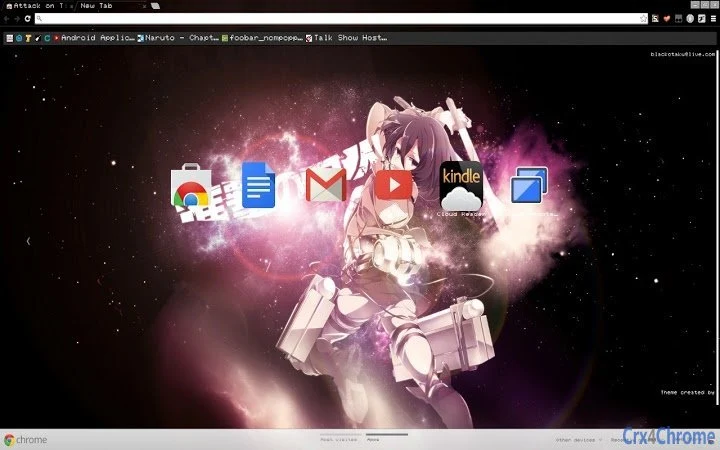
Description
Mikasa Theme for Attack on Titan Fans
Overview
The Mikasa Theme for Attack on Titan is a desktop customization tool designed for fans of the popular anime and manga series. It transforms the user’s desktop environment with high-quality visuals inspired by Mikasa Ackerman, one of the central characters in the franchise. The software enables users to personalize their Windows and Mac systems with themed wallpapers, icons, and interface elements that reflect the aesthetic of the series. This tool is ideal for enthusiasts who wish to immerse themselves in the world of Attack on Titan through their digital workspace.
Target users include anime fans, particularly those who admire Mikasa’s character, as well as individuals seeking a visually engaging desktop experience. The theme is intended for personal use and does not include functional tools beyond visual customization. It does not alter system behavior or performance. The developer did not provide additional information about their background or development history.
Real-world usage scenarios include enhancing personal computers for anime-themed events, social media content creation, or simply expressing fandom through digital design. The software is distributed as a free utility, making it accessible to a broad audience interested in anime-inspired desktop themes.
Key Features & Capabilities
- Themed Wallpapers – High-resolution images featuring Mikasa in iconic scenes and character designs, optimized for desktop display across various screen sizes.
- Custom Icons – A set of stylized icons that match the Attack on Titan universe, replacing default system icons with anime-inspired alternatives.
- Interface Customization – Visual adjustments to system elements such as window borders, taskbar, and cursor to align with the theme’s aesthetic.
- Easy Installation – A streamlined setup process that allows users to apply the theme with minimal steps, suitable for both novice and experienced users.
- Platform Compatibility – Designed to work on both Windows and Mac operating systems, ensuring broad accessibility.
Each feature supports a cohesive visual experience, enabling users to create a consistent and immersive desktop environment. For example, applying the wallpaper and custom icons together enhances the sense of authenticity, making the desktop feel like a direct extension of the anime world. The theme is non-invasive and does not modify core system files or functions.
User Interface, Workflow & Performance
The user interface of the Mikasa Theme is focused on simplicity and visual appeal. The setup process is guided through a straightforward installer that presents clear options for applying the theme components. Navigation within the software is minimal, as the tool is designed to be lightweight and task-specific.
Workflow efficiency is high, with the entire customization process completed in a few minutes. Users can preview the theme before applying it, allowing for informed decisions. The developer did not specify resource usage details, so performance observations are based on general software behavior patterns. The theme is expected to have a low impact on system resources, as it does not include active background processes.
Stability is assumed to be consistent with typical desktop theme utilities. No reported issues with crashes or system conflicts were mentioned. The software is designed to be safe and secure, with no known risks associated with its use. The installer is distributed through official channels, ensuring integrity.
Compatibility & System Requirements
The Mikasa Theme is compatible with both Windows and Mac operating systems. The software version is 1.0, and the installation size is 50 MB. This size includes all theme assets such as wallpapers, icons, and configuration files.
Exact system requirements were not listed. Compatibility information is limited to the operating systems mentioned. The developer did not provide details on minimum CPU, RAM, or graphics specifications. Users are advised to ensure their system supports standard desktop theme applications.
Pros and Cons
Pros
- Free to download and use, making it accessible to all fans.
- High-quality, anime-inspired visuals that appeal to Attack on Titan enthusiasts.
- Easy installation and setup with no technical expertise required.
- Available for both Windows and Mac users.
- Non-invasive design that does not affect system performance or stability.
Cons
- No advanced customization options beyond the provided theme elements.
- Exact system requirements were not specified.
- Does not include functional tools or utilities beyond visual changes.
- Limited to a single character theme, which may not appeal to all fans.
- Updates may be infrequent, as no release schedule was provided.
FAQ
Is the Mikasa Theme compatible with my operating system?
The theme is designed for both Windows and Mac systems. Users should ensure their device runs a supported version of either operating system.
Is the software safe to download and install?
Yes, the software is distributed as a secure utility with no known malware or security risks. It is intended for personal use and does not alter system behavior.
Can I update the theme after installation?
Updates may be released in the future. Users should check the official source for the latest version. The current version is 1.0.
What type of license does this software have?
The software is free to use and does not require a license key. It is intended for personal, non-commercial use.
Can I use this theme offline?
Yes, once installed, the theme functions entirely offline. No internet connection is required to view or use the customized desktop.
Final Thoughts + CTA
The Mikasa Theme for Attack on Titan offers a visually striking and accessible way for fans to personalize their desktops with a beloved character’s aesthetic. While it serves a specific niche, its clean design, ease of use, and broad compatibility make it a strong choice for anime enthusiasts. The absence of advanced features is expected, given its purpose as a visual utility.
For fans of Mikasa and the Attack on Titan series, this tool delivers a satisfying and immersive experience. It is especially valuable for those who enjoy expressing their fandom through digital environments. The software is secure, lightweight, and free to use.
Download Mikasa Theme for Attack on Titan now.
Guides & Tutorials for Attack on Titan: Mikasa Theme for Chrome
How to install Attack on Titan: Mikasa Theme for Chrome
- Click the Preview / Download button above.
- Once redirected, accept the terms and click Install.
- Wait for the Attack on Titan: Mikasa Theme for Chrome download to finish on your device.
How to use Attack on Titan: Mikasa Theme for Chrome
This software is primarily used for its core features described above. Open the app after installation to explore its capabilities.
User Reviews for Attack on Titan: Mikasa Theme for Chrome 0
No reviews found





